Frequently asked questions
What is AUTONEST VC?
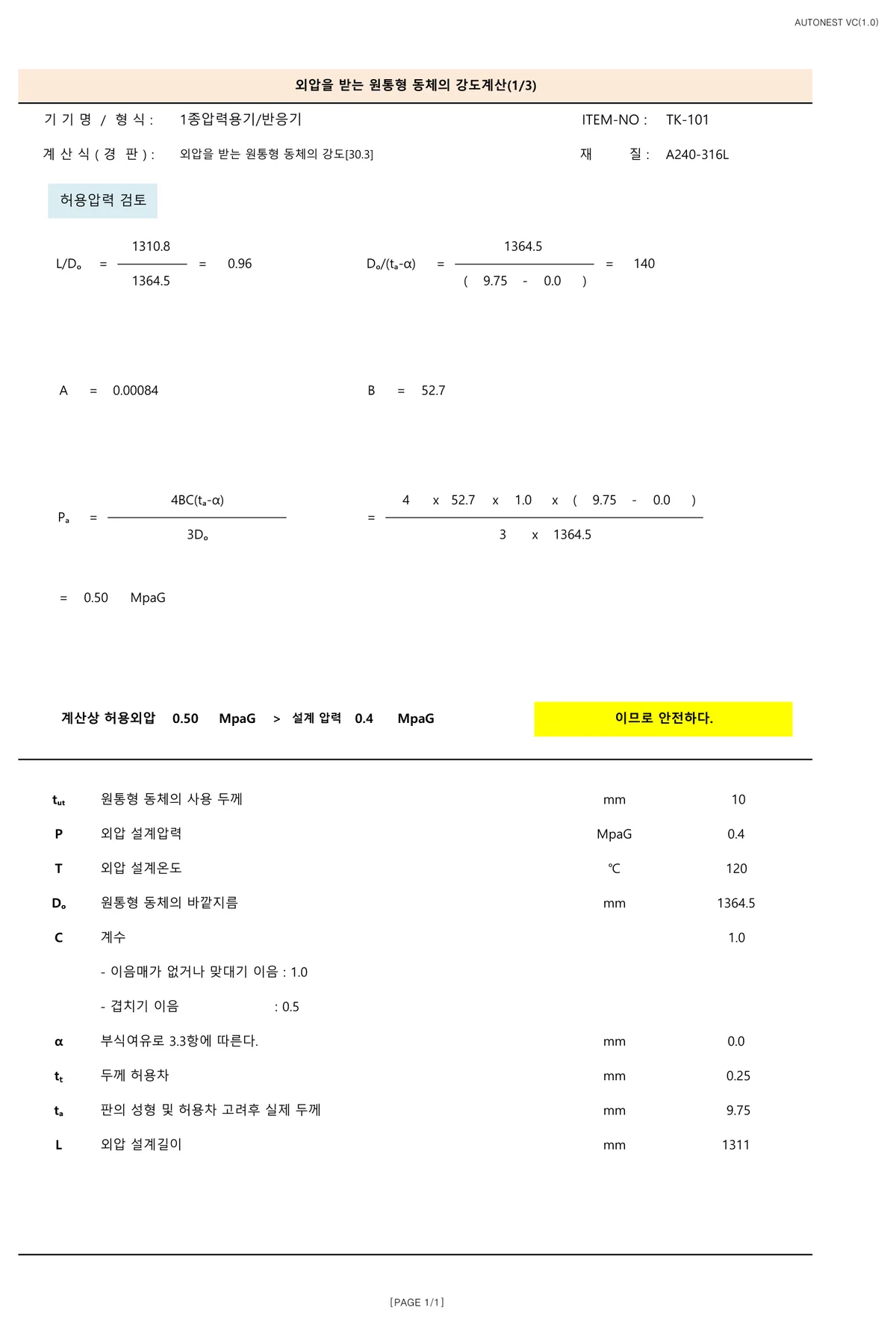
AUTONEST VC is pressure vessel strength calculation software. It runs internal pressure, external pressure (vacuum and jacket) and nozzle reinforcement calculations to the “Standard for Inspection and Inspection Exemption of Heat-Using Equipment” (unofficial English translation; MCEE Notice No. 2025-61, Korea, partially amended 18 Dec 2025) and generates the calculation report, drawings and BOM automatically. Made in Korea by AUTONEST, it replaces the Excel spreadsheet work for shell and head thickness, allowable stress, weld joint efficiency and hydrostatic test pressure (Korea Energy Agency inspection basis).
Can it replace the Excel spreadsheets used for pressure vessel calculations?
Yes. AUTONEST VC is pressure vessel strength calculation software made in Korea, and it replaces that spreadsheet work. It calculates to the “Standard for Inspection and Inspection Exemption of Heat-Using Equipment” (unofficial English translation; MCEE Notice No. 2025-61, Korea, partially amended 18 Dec 2025; Korea Energy Agency inspection basis) and produces a calculation report in Excel with the working shown.
- Shell and head thickness for internal pressure — allowable stress by temperature and weld joint efficiency
- External pressure (vacuum) and jacket — inner vessel and jacket checked separately
- Nozzle reinforcement · flanges
- Hydrostatic test pressure
- Calculation report (Excel) · drawings (DXF) · BOM — Korean · English · Chinese
- Starts from capacity alone and works out dimensions and thickness
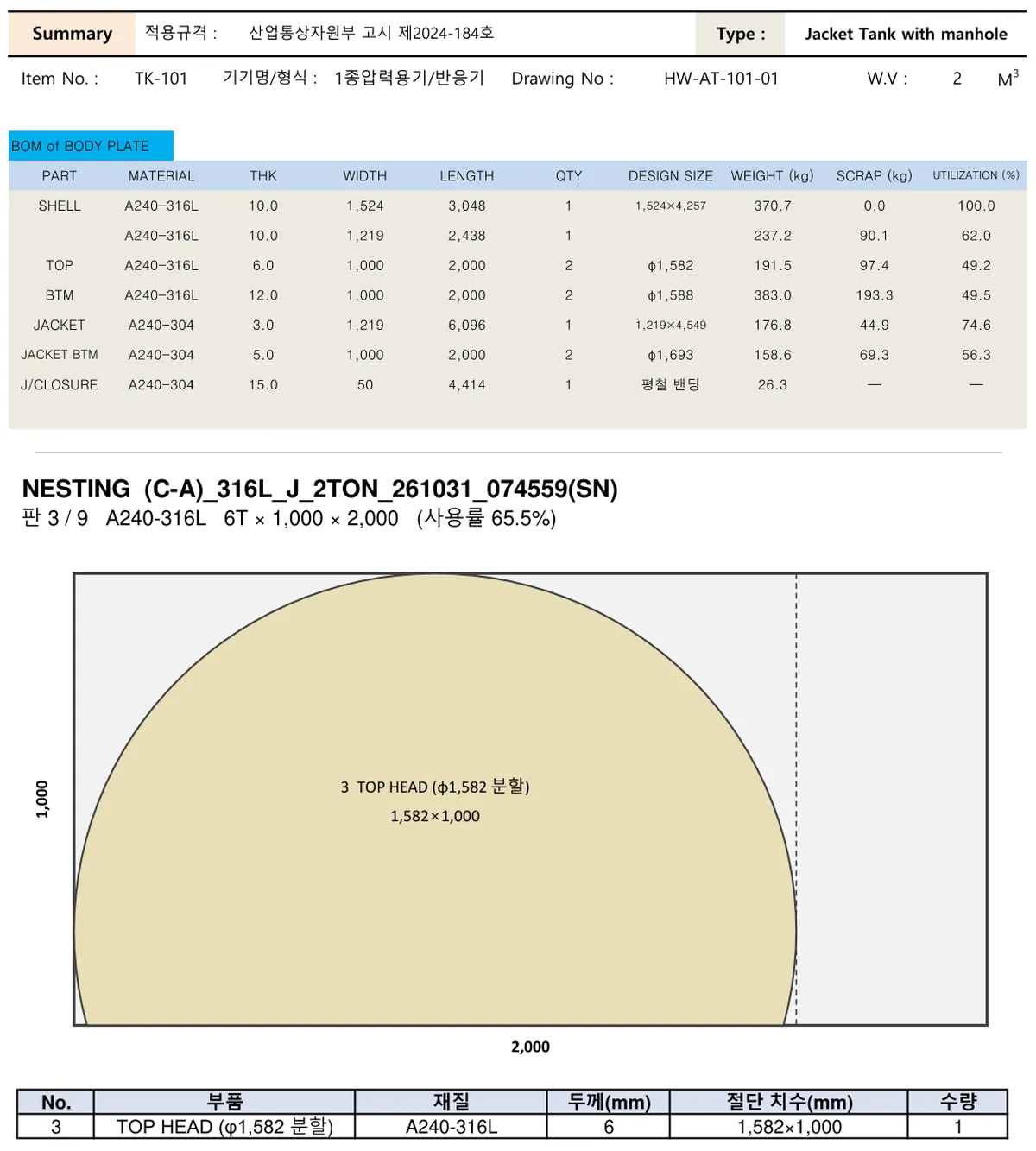
- Automatic search for plate combinations with fewer stock sheets and less weight
- Calculation is automatic; review and approval stay with your engineer — basic input is type, capacity, pressure and temperature
Does the pressure vessel strength calculation software set the shell and head thickness automatically?
Yes. From design pressure, temperature, material, joint efficiency and corrosion allowance it calculates the required thickness for internal pressure of the shell and heads (2:1 ellipsoidal · 10% torispherical), then picks a stock plate thickness allowing for the thinning from head forming and the plate tolerance. With vacuum or a jacket it finds the thinnest plate that also passes external pressure, and the basis stays in the calculation report. For a quick internal-pressure check only, try the free pressure vessel thickness calculator.
If I only enter the tank capacity, does it calculate external pressure (vacuum) automatically as well?
Yes. Enter the type (single, jacketed, flanged), capacity, pressure and temperature, and it sets the inner diameter, length and head shape, then runs the internal, external and vacuum strength calculations and selects the plate thickness in one pass. External pressure is worked through A/B chart interpolation down to the minimum thickness, and the chart stays in the report. You can also give the dimensions directly.
When the designer is busy, can we still get quote drawings and calculations out fast?
Yes. Enter the type, capacity and design conditions in AUTONEST VC and press [Calculate]: the strength report, drawings (DXF), bill of materials and plate cutting layout come out in minutes. Hours become minutes, but someone still reviews and approves the result — which is why the report is delivered as the original Excel file.
Does it handle jacketed (double-wall) tanks and flanged tanks?
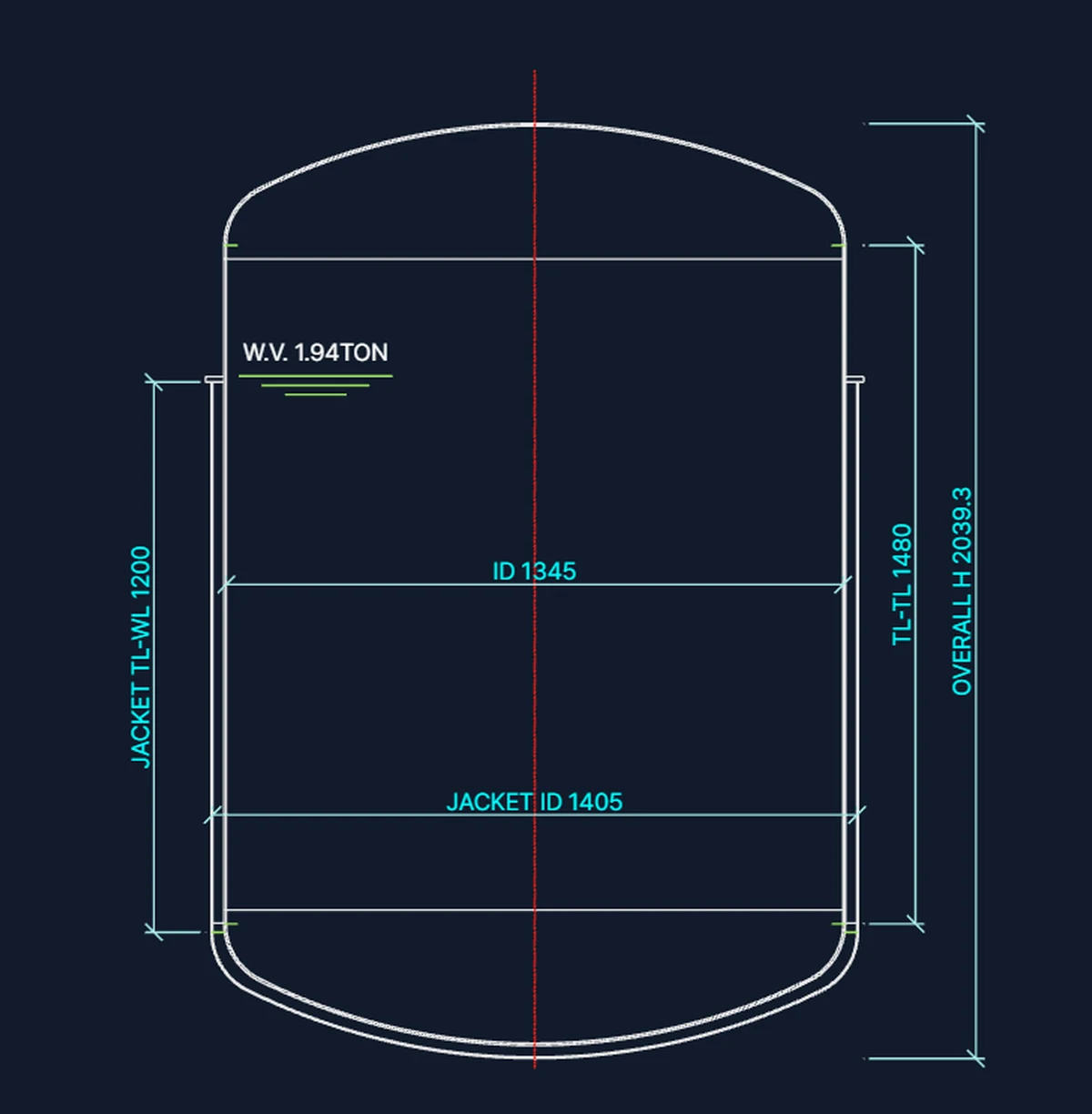
All six body combinations are supported: single, jacketed, single flanged, jacketed flanged, and the bolted flat-cover variants. For jackets, the inner vessel and the jacket are each checked for internal and external pressure, and the clearance and jacket length are set automatically.
Which standard does it calculate to?
It calculates to the “Standard for Inspection and Inspection Exemption of Heat-Using Equipment” (unofficial English translation; MCEE Notice No. 2025-61, Korea, partially amended 18 Dec 2025), the Korean rules for inspected pressure vessels under the Energy Use Rationalization Act (same content as the former MOTIE notice; only the ministry name changed), and the report comes in the format attached to a Korea Energy Agency inspection application. For overseas submission, the report can also be produced in English or Chinese. Read the notice on the Korean Law Information Center (Korean)
Can it be used for Korea Energy Agency (KEA, formerly KEMCO) pressure vessel inspection documents?
It comes out in the format attached to an inspection application; whether it meets the requirements is decided by the inspection agency. The strength calculation report comes out in the format attached to a Korea Energy Agency (KEA, formerly Korea Energy Management Corporation) inspection application. It calculates to the rules for inspected pressure vessels (Class 1 and 2) under Korea's Energy Use Rationalization Act — the “Standard for Inspection and Inspection Exemption of Heat-Using Equipment” (unofficial English translation; MCEE Notice No. 2025-61, Korea, partially amended 18 Dec 2025) — and keeps the internal and external (vacuum) pressure basis in the report. The drawings (DXF) and weld map (RT locations) produced with it are used to prepare the inspection package too. Agency application forms are filled in separately. To check first whether a vessel needs inspection, use the free pressure vessel inspection check.
Which languages does it support?
Three: Korean, English and Chinese (中文). The installer and the program screens follow the language you pick at install (you can switch the screen later under Help → Screen language). The report language is chosen separately under 'Report language' on the app's top row — the next calculation comes out in that language, and the cutting layout and weight/heat sheets follow it. The calculation basis and the numbers are the same in every language.
Will updates and support continue?
Updates are provided for the whole license term and applied automatically when you start AUTONEST VC (released September 2026). Support is by email, and bugs or suggestions can also be sent from the [Account] menu at the top right of the app. The report (original Excel) and the drawings (DXF files) stay on your PC and open without the program, and if the service is discontinued for reasons on our side, the remaining term is refunded (Terms, article 10).
Which materials are supported, and what is out of scope?
Materials are A240 316L and 304 only; carbon steel and other materials are not supported. Shell, heads, nozzles, girth flanges, weld map, RT film count, BOM, cutting layout, 3D model and weight are all automatic. Legs, supports, saddles, skirts and other support structures, and special nozzles beyond the limits of the reinforcement calculation rules, are outside the calculation scope — you can add them in the original Excel report.
How is it different from general-purpose design-code programs?
Those are general-purpose design-code calculators that cover many shapes and loads. AUTONEST VC is built for fabricators making standard stainless tanks to the Korean rules, and it does not stop at the strength calculation: one calculation produces the drawings (DXF), bill of materials, cutting layout and 3D model in one flow. Complex special vessels suit a general-purpose program; repeated standard tanks suit AUTONEST VC.
Why a term license (1 or 2 years)? Is there a perpetual license?
There is no perpetual license. AUTONEST VC is licensed for a set term (1 or 2 years, per PC). Updates (feature improvements and bug fixes) are provided for the whole license term and applied automatically when you start AUTONEST VC. Support is by email, and bugs or suggestions can also be sent from the [Account] menu at the top right of the app. After the term ends, the reports (original Excel) and drawings (DXF files) you made stay on your PC and open without the program.
What does it cost, and is there a free trial?
₩1.5M for one year or ₩2.5M for two years, per PC, VAT excluded, with updates included for the term. After installing, request a free trial with your email in the app and a trial key is issued (14-day free trial, up to 30 days depending on optional choices); if you buy during the trial, your inputs, settings and result folder carry on as they were (sign in with the new license key from the email: [Account] at the top right of the app → Log out → sign in again). For Korean businesses, an electronic tax invoice is issued once payment clears. For internal review, see the Purchase review sheet (PDF, 1 page).